
In This Article

Small business password security is a customer retention strategy, and most solopreneurs treat it like an IT checkbox. According to the Zoho State of Workforce Password Security 2026, a study of 3,322 professionals, 1 in 3 businesses experienced a confirmed cyberattack last year. A credential-driven breach does two things simultaneously: it takes your business offline and it forces you to send the email that ends client relationships. Getting your password house in order is how you prevent both.
The scariest email I ever helped a business owner send started with “We want to inform you that your data may have been compromised.” She ran a small bookkeeping firm. She had 47 client login credentials sitting in a shared Google Sheet. One contractor she had let go six months earlier still had access. She did not know until after the breach. Three clients left within the week. The breach itself did not end those relationships. What ended them was what the breach revealed: that she had not been paying attention to their data.
Why Small Business Password Security Is a Customer Retention Problem
When 1 in 3 businesses get hit with a cyberattack in a single year, being the vendor who did not get hit is a competitive differentiator. Your clients are making decisions about who to trust with their money, their data, and their business operations. A credential-driven attack breaks that trust in a way that a missed deadline or a billing dispute never quite does.
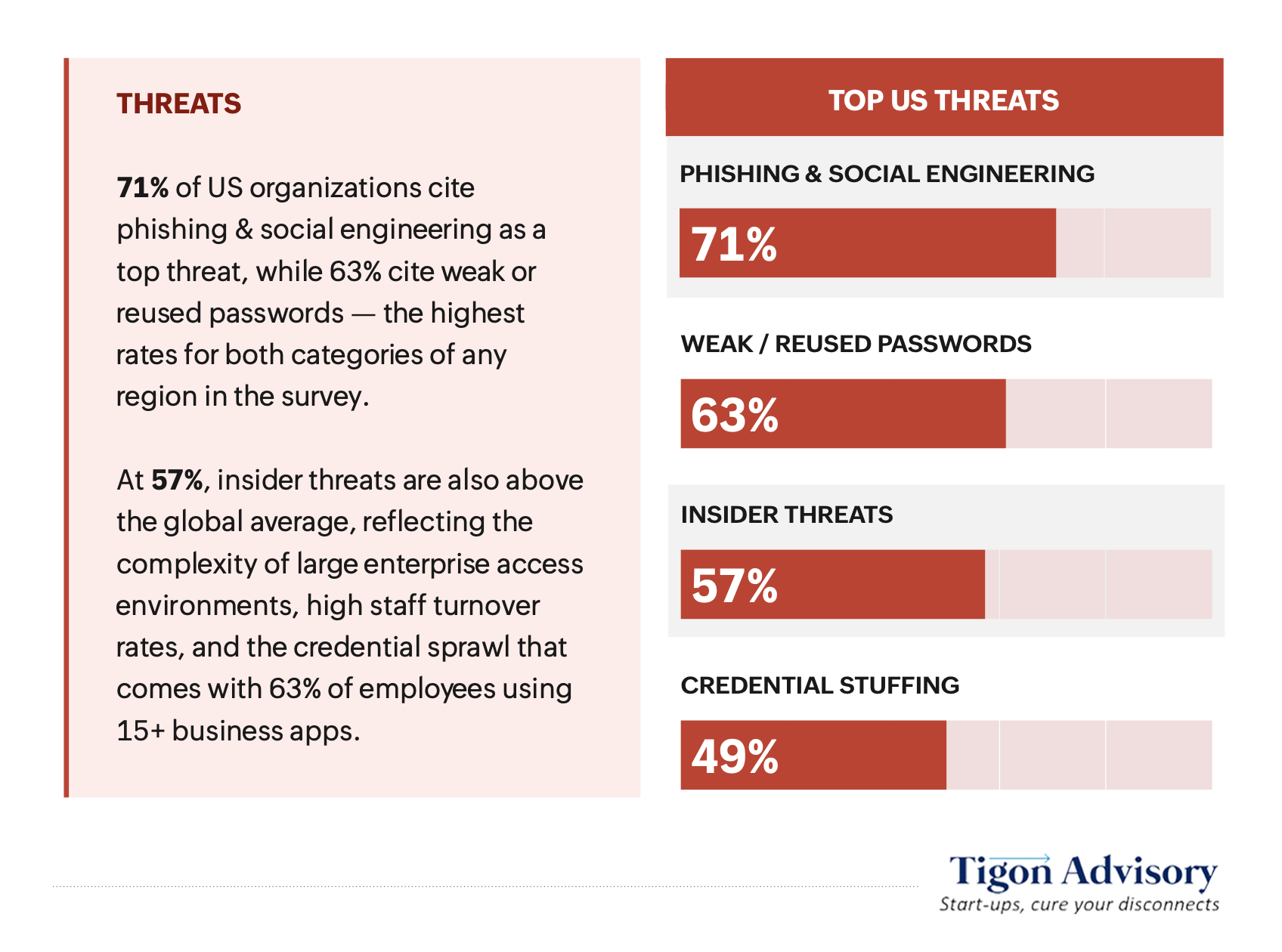
The 2026 Zoho and Tigon Advisory research found that phishing and social engineering ranked as the top threat among U.S. businesses at 71%, followed by weak or reused passwords at 63%. Both figures are the highest of any region surveyed globally. These are the attacks that take your business offline, expose client data, and trigger the apology email.
There is also the reliability angle. Customers stay with businesses that are consistently available and consistently trustworthy. A phishing attack that compromises your email takes down your communication with clients. Any business that depends on consistent service delivery cannot afford to treat credential security as optional.
What the Credential Blind Spot Means for Your Client Relationships
The 2026 research introduces a concept called the “identity visibility gap,” and it is directly relevant to anyone who works with clients. 76% of U.S. organizations lack complete visibility into who has access to their systems. That number includes orphaned accounts, undocumented logins, and access that was granted to a contractor or assistant and never revoked.
For a solopreneur or small business owner, this plays out in a specific way. You bring on a VA. You share credentials to your CRM, your project management tool, your client portal. The contract ends. You move on. You do not change the passwords because you have eleven other things to handle that week. Six months later, that former contractor still has access to your clients’ files.
This is the orphaned account problem. An orphaned account is a login that remains active after the person who used it has left your business. The Zoho research found that 88% of organizations lack complete identity visibility when orphaned accounts are included in the count. For most solopreneurs, the number of orphaned accounts they carry without knowing is significant.
A centralized password vault solves this directly. You grant access through the vault. When the contract ends, you revoke access in the vault. The contractor loses access to every shared credential simultaneously, without you needing to manually change 15 passwords across 15 platforms.
How Small Business Password Security Becomes a Competitive Advantage
Credential hygiene is a trust signal. Trust signals are what keep customers.
If you work in bookkeeping, law, consulting, marketing, HR, or any field where clients hand you access to sensitive systems, your security posture is part of your service offering. Clients who ask “how do you protect my data?” and get a confident, specific answer are clients who stay longer. Clients who never ask the question and later discover you were managing their credentials in a spreadsheet are clients who leave.
The 2026 research found that only 26% of organizations globally have deployed a dedicated password manager. That means 74% of your competitors are managing credentials with shared spreadsheets, browser autofill, and recycled passwords. Being in the 26% is a differentiator worth talking about. It becomes part of the onboarding conversation: “Here is how we manage your credentials and how you can verify access at any time.”
That transparency builds the consistency that customer loyalty runs on. Customers stay with businesses that are reliable. A password manager is the infrastructure that makes reliability possible at the credential level.
Step 1: Governance first. Get every credential into a single vault. Know what you have access to and who else has access to anything you own or manage for clients.
Step 2: Add MFA to every critical account. Your email, CRM, client portals, banking, and website host. Multi-factor authentication adds a second verification layer so a stolen password alone is not enough to get in.
Step 3: Consolidate your tools. The 2026 research found that 40% of organizations manage 3 to 5 security vendors. That integration overhead is unmanageable without IT staff. One integrated platform beats five disconnected tools every time.
The Four-Step Small Business Password Security Fix
The Zoho 2026 report closes with six imperatives for organizations in 2026. Here is the DIYMarketers translation: what you can do this week, without an IT consultant, for under $20 a month.
Step 1: Run a credential audit and close your orphaned accounts. List every app you have signed up for in the last three years. Include trials you abandoned, tools you used once, and client portals you technically still have access to. Any account no longer actively used is a door that needs to be closed. Cancel or delete it. For accounts you cannot delete, change the password to something randomly generated and move it into your vault so it is at least tracked and governed.
Step 2: Choose a password manager and migrate in one dedicated session. Block two hours. Pick a vault with opinionated defaults, meaning it works out of the box without IT configuration. Zoho Vault integrates with the broader Zoho ecosystem if you are already on that platform. 1Password Business and LastPass for Business are two additional options with SMB tiers under $5 per user per month. Move your email, banking, CRM, website, payment processor, and all client-facing tools in first.
Step 3: Enable Multi-Factor Authentication on every critical account. MFA requires a second verification step beyond your password, typically a code from your phone or an authenticator app. Even if someone obtains your password through a phishing attack or data breach, they cannot get in without that second factor. Start with email, since your email account is the master key to every other account’s password reset. Then banking, then everything else. Authy and Google Authenticator are both free and work across platforms.
Step 4: Train every person who touches your systems. Phishing and social engineering ranked as the top threat for U.S. businesses at 71% in the 2026 data. This is a human behavior problem before it is a technology problem. If you have a VA or a contractor, spend 20 minutes walking them through how to recognize a phishing email. The CISA Stop.Think.Connect. Toolkit is free and written for non-technical people.
Security is the silent infrastructure that lets you deliver the consistency your clients are paying for. When your systems stay up and your data stays protected, your clients stay. That is the return on this investment.
How Does a Password Manager Protect Small Business Client Relationships
A password manager stores every login credential in an encrypted, centralized vault. You access it with one master password. The vault generates strong, unique passwords for every account and logs who accessed what and when.
The client relationship protection comes from two specific features: access control and audit trails. When you add a contractor to the vault, you grant them access to specific credentials only. When the contract ends, you revoke that access in one step. Every action in the vault is logged, so if a client ever asks “who has access to my account,” you have a documented answer.
For service businesses, that documentation is a trust asset. It shows clients that you manage their credentials with the same intentionality you bring to every other part of their account. That is the kind of consistency that keeps clients from shopping around.
Frequently Asked Questions About Small Business Password Security
What is the biggest password security risk for small businesses?
The top two risks are phishing and weak or reused passwords, both of which ranked highest in the 2026 Zoho and Tigon Advisory research, with U.S. organizations reporting the highest rates of any region surveyed at 71% and 63% respectively. Phishing attacks exploit human behavior: someone clicks a fake link and hands over their credentials. Reused passwords mean one breach cascades across every account that shares that password. A centralized vault with MFA enabled on all critical accounts addresses both risks directly and keeps client data protected.
Do small businesses really need a password manager?
The 2026 research found that the average worker now uses 15 or more business applications daily. Each application is a separate credential that needs to be created, stored, and governed. Without a password manager, the options are reusing passwords across accounts (a documented vulnerability), storing them somewhere unencrypted like a spreadsheet or browser, or relying on memory. Password managers for small business cost under $5 per user per month and take about two hours to set up. The time and cost investment is minimal relative to the client relationship risk of going without one.
What is an orphaned account and why does it matter for customer retention?
An orphaned account is a login that remains active after the person who held it has left your business or changed roles. For solopreneurs, this typically means a former VA or contractor who still has access to client portals, your CRM, or shared tools from months or years ago. The 2026 research found that 88% of organizations lack complete identity visibility when orphaned accounts are included. The customer retention risk is direct: if a former contractor accesses or exposes client data through an account you forgot to close, the client holds you responsible. A centralized vault makes closing orphaned accounts immediate and auditable.
How does phishing affect small business customer relationships?
A successful phishing attack on a small business typically compromises email access first, since email is the master key to every other account’s password reset. From there, an attacker can access client communications, financial records, project files, and any system your email account connects to. The 2026 data found that 34% of U.S. businesses experienced a confirmed attack last year, with phishing and social engineering cited as the top threat by 71% of respondents. Beyond the technical damage, the breach notification email that follows is one of the strongest drivers of client churn a small business can face.
How do I know if my small business passwords have already been compromised?
Start with HaveIBeenPwned.com, which lets you check whether any of your email addresses have appeared in known data breaches. Review your email account’s sign-in history for unfamiliar locations or login times. Check your payment accounts for unauthorized charges. If you use Google Workspace, the security dashboard shows active sessions and third-party app access. The 2026 Zoho research found that 7% of businesses could not confirm whether they had been attacked at all. Running a quarterly credential audit and keeping all credentials in a password manager addresses that visibility gap directly.