
In This Article

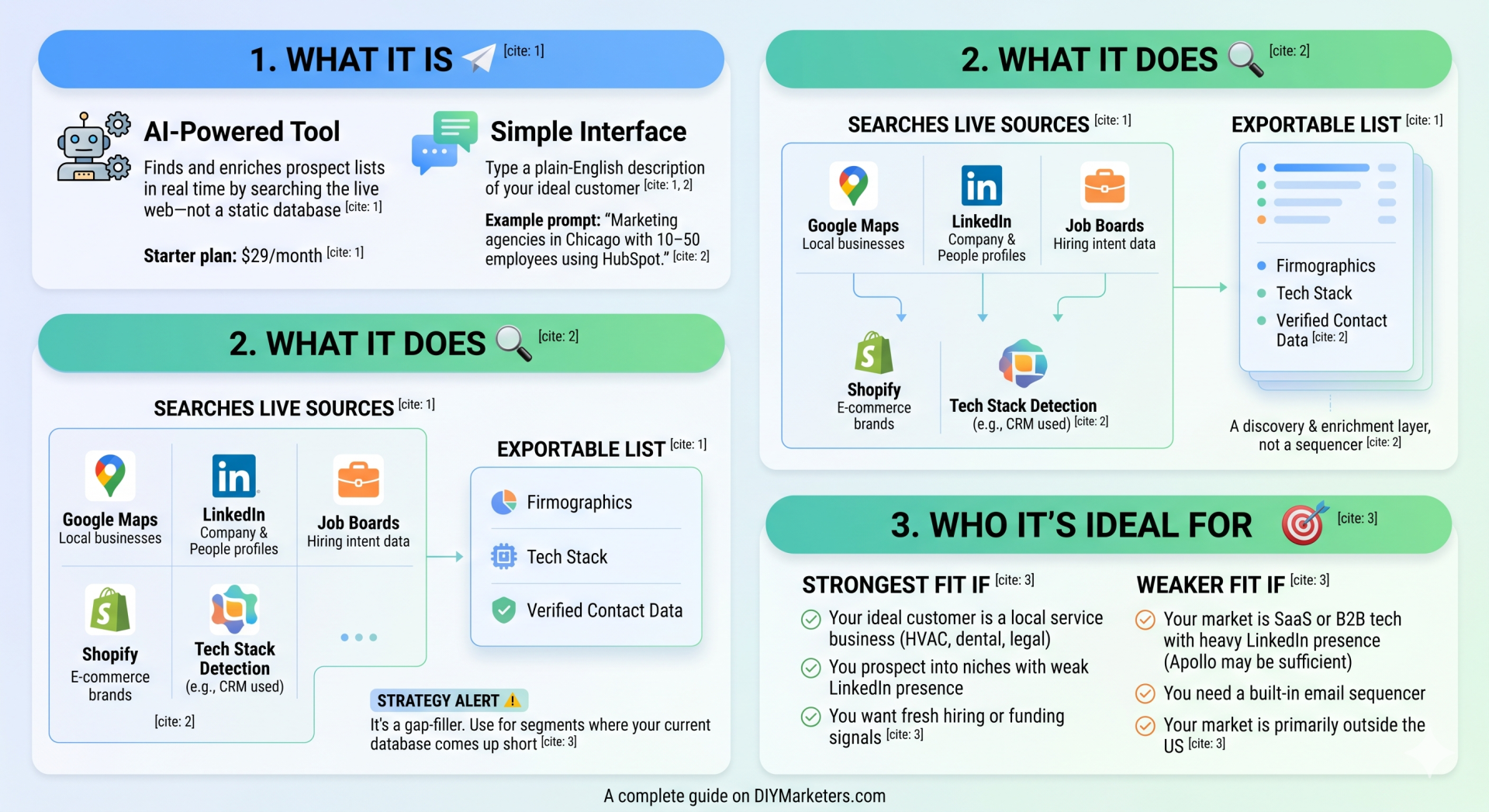
Origami.chat is an AI-powered lead generation tool that finds and enriches prospect lists in real time by searching the live web—not a static database. You type a plain-English description of your ideal customer, and Origami’s AI agents search 15–50+ live sources simultaneously (Google Maps, LinkedIn, job boards, Shopify, funding databases, and more) to build you a structured, exportable list of companies and contacts. The Starter plan runs $29/month.
The first time I saw this tool demoed, my reaction was skepticism. I’ve watched too many “AI-powered” tools promise to find leads your competition can’t find—and then spit out the same recycled Apollo data with a chatbot painted on top. Origami looked different enough that I decided to put it through a structured test before recommending it to anyone. Here’s what I found.
What Is the Origami Lead Generation Tool and How Does It Work?
The interface is deceptively simple. You type something like: “Marketing agencies in Chicago with 10–50 employees using HubSpot.” Origami’s AI agents go to work across dozens of live sources simultaneously and return a table of matching companies—with firmographics, tech stack, and verified contact data already attached.
That’s the pitch. The reality is that the quality of your output depends heavily on how specific and searchable your prompt is. More on that in the testing section.
Here’s what Origami searches in the background:
- Google Maps — Local businesses by category, location, star rating, and review count. This is where Origami genuinely shines for SMB-focused lead gen.
- LinkedIn Companies and People — 69M+ company profiles and decision-maker contacts searchable by title, company, location, and seniority.
- Job boards (100+) — Used as intent data. A company hiring a “VP of Sales” right now is a different kind of lead than one that isn’t.
- Shopify and WooCommerce — E-commerce brands filterable by category, platform, and estimated traffic.
- Tech stack detection — Identifies what CRM, marketing automation, or analytics tools a company runs.
- Funding and news signals — Recent funding rounds, leadership changes, and PR events that indicate buying readiness.
- Social creators — Instagram, YouTube, TikTok, and Twitch accounts searchable by niche and engagement metrics.
The output is a structured table you can filter and export as CSV, then pipe into whatever outreach tool you’re already using—Lemlist, Instantly, HubSpot, or even a plain Gmail sequence. Origami.chat is a discovery and enrichment layer, not a sequencer. You’ll need your own outreach infrastructure.
Who Is Origami Best Suited For?
There’s a specific type of small business owner or fractional marketer who will get immediate value from this tool, and a type who won’t.
Origami is a strong fit if:
- Your ideal customer is a local service business—HVAC, dental, landscaping, law firms, specialty contractors.
- You’re prospecting into niches that don’t have a strong LinkedIn footprint.
- You’re doing outreach for a client in a vertical where Apollo gives you thin or stale results.
- You want to find companies using a specific tech stack as a targeting signal.
- You need fresh hiring or funding signals, not just a static contact dump.
Origami is a weaker fit if:
- Your market is SaaS or B2B tech with heavy LinkedIn presence—Apollo is probably sufficient and includes outreach tooling Origami doesn’t have.
- You need a built-in email sequencer and don’t want to add another tool to your stack.
- Your market is primarily outside the US or requires non-English interface support.
Origami Pricing Breakdown
The pricing structure is straightforward, which I appreciate. No “contact sales” requirement at the entry level.
| Plan | Price | What You Get | Best For |
|---|---|---|---|
| Free | $0 | 1,000 credits, 30 rows/table, no CSV export, no contact data | Testing the interface before committing |
| Starter | $29/month | Unlimited messages, unlimited rows, CSV export, contact data enabled | Solo operators and small teams doing outreach |
| Enterprise | Custom | Unlimited everything, custom SLA, SSO, Slack channel, priority model access | Agencies and larger teams with high volume |
The Starter plan at $29/month is well within the DIYMarketers $17/day budget philosophy if you’re using it as a focused outreach tool, not a replacement for your entire go-to-market stack. Credits govern how many rows and contacts you generate and enrich each billing cycle.
One thing to note: early reviewers flagged confusion about whether a free plan existed. The pricing and trial model has changed a few times since launch. Always check origami.chat directly for current offer terms before making a decision based on what you read in a review (including this one).
How Does Origami Compare to Apollo and ZoomInfo?
This is the question every small business owner asks, so let’s answer it directly.
| If You See This… | It Means… | Your Next Move |
|---|---|---|
| Your Apollo search returns fewer than 50 results for a local ICP | Your market is underrepresented in static databases | Test Origami with a Google Maps-sourced prompt for that same ICP |
| Your bounce rate from a purchased list is above 5% | The contact data is stale | Compare against Origami’s waterfall-verified contacts before your next campaign |
| You want companies using a specific tool as a targeting signal | Tech stack targeting will improve your relevance | Use Origami’s tech stack detection layer with a specific tool filter |
| You sell B2B SaaS to LinkedIn-active buyers | Static databases already cover this market well | Apollo with sequences built in is probably more efficient for your workflow |
The short version: Origami wins on local SMB discovery and live data freshness. Apollo wins on all-in-one outbound workflow (sequences, CRM sync, dialer). ZoomInfo wins on enterprise depth and budget, but starts around $15,000/year—which means it’s not on the table for most solopreneurs and small teams.
For the small business owner doing their own marketing, Origami as a discovery layer paired with a low-cost sequencer (Instantly or Lemlist) is a competitive stack at well under $200/month total. That’s a legitimate alternative to paying Apollo’s higher-tier pricing for features you may never use.
If you’re trying to figure out whether your current lead generation approach is actually working—before you layer in a new tool—a referral marketing strategy is still one of the highest-ROI options available. No tool replaces warm introductions.
What Real Users Say About Origami
Origami launched publicly on Product Hunt and hit #1 Product of the Day—which generates a burst of excitement but not a lot of critical depth in the reviews. Here’s a more balanced read of what independent reviewers have actually said.
The positives that show up consistently:
- The prompt-based interface genuinely lowers the barrier to entry versus building complex Boolean searches or managing multiple enrichment APIs.
- Multi-source enrichment produces more contextual lead records than most single-source tools—you’re not just getting an email address, you’re getting a picture of the company.
- Early-adopter reviews on third-party sites give it a 4.7/5 and specifically call out the automatic fit score and buying signal detection (funding, hiring, leadership changes) as differentiators.
- Flat pricing with no per-seat fees makes it accessible for small teams.
The concerns worth taking seriously:
- English-only interface and a primarily US-focused data model. If your market is international, this is a real limitation.
- Pricing and free tier availability has changed multiple times since launch, which creates confusion and erodes trust with early evaluators.
- It’s a young product. One detailed independent review noted that accuracy and consistency “are not yet battle-tested at huge scale”—which is the honest truth about any tool this new.
How to Test Origami Lead Quality Before You Commit
This is the section I’m most interested in sharing, because the question “is this tool good?” is less useful than “is this tool good for my specific ICP?” Those are very different questions, and the only way to answer the second one is a structured bake-off.
Here’s the framework I recommend—the same one I’d use with any data provider evaluation.
Step 1: Pick One Narrow ICP and Stick With It
Don’t test three different segments at once. The test gets messy and you won’t know what you’re comparing. Pick the one ICP where your current tools frustrate you most.
Good test candidates for Origami specifically:
- Local service businesses (HVAC, dental, legal, landscaping) in a specific metro
- E-commerce brands on Shopify in a specific niche
- Companies in a defined vertical that are actively hiring for a specific role
Write your ICP as one sentence: “Independent HVAC contractors in Ohio with 5–50 employees and evidence of commercial service work.” That sentence becomes your Origami prompt and your Apollo filter set.
Step 2: Build Three Lists—Then Compare Overlap
Run the same ICP through Origami, your current database (Apollo, ZoomInfo, or wherever you prospect now), and look at what’s unique to each. The overlap is expected. The net-new accounts are the test.
- List A: Origami only
- List B: Your current tool only
- List C: Accounts found by both
Export 100 accounts from each source. De-duplicate by domain (not company name—names vary). The percentage of unique valid accounts tells you whether Origami is actually finding companies the other tool misses, or whether it’s surfacing the same database with a different interface.
Step 3: Audit 30–50 Records Manually
This is the part most people skip. Don’t.
For each record you’re auditing, check:
- Does the company website actually match the company name?
- Is the employee band plausible based on what you can see on LinkedIn or Google Maps?
- Does the contact name and title appear to be a current employee?
- Is the email format consistent with the domain? (Origami claims to run a multi-provider waterfall to verify—test whether the delivered addresses actually pass a third-party verifier like NeverBounce or ZeroBounce.)
Your target benchmark: under 3% bounce rate after verification. Over 5% is a signal that the contact data isn’t ready for cold outreach without a scrubbing step.
Step 4: Test Three Prompt Styles, Not Just One
Origami is prompt-first, which means its quality scales with your ability to describe what you want. Run your ICP through three prompt types:
- Broad prompt: “HVAC contractors in Ohio with 5–50 employees.”
- Constraint prompt: “HVAC contractors in Ohio with 5–50 employees that appear to do commercial work.”
- Signal prompt: “HVAC contractors in Ohio with 5–50 employees hiring installers or service techs in the last 60 days.”
If the quality improves substantially as the prompts get more specific, that’s a sign the tool is working as designed. If all three return roughly equivalent results, you’re either in a saturated segment or the tool isn’t leveraging its live signals effectively.
Step 5: Score Each Tool on a Weighted Rubric
Use a simple weighted scorecard so one flashy feature doesn’t mask poor data quality. Here’s the weighting I’d apply:
| Category | Weight | What to Measure |
|---|---|---|
| Data accuracy | 35% | Bounce rate, name/title correctness, domain match |
| ICP coverage (fit rate) | 25% | % of returned accounts that actually match your ICP |
| Net-new discovery | 15% | % of unique valid accounts not in your other tool |
| Workflow speed/ease | 15% | Time to first usable list, cleanup time, VA-trainability |
| Signal depth | 10% | Hiring signals, funding signals, tech stack, recency |
Rate each category 1–5 per tool, multiply by weight, add up the scores. The tool with the higher weighted score wins for your specific use case—not for someone else’s ICP.
Step 6: Run a Mini Outreach Test (Optional but Recommended)
If you want campaign-level evidence, send an equal batch from each tool’s verified list using identical messaging. Track delivery rate, bounce rate, reply rate, and booked meetings. Keep the copy identical—otherwise you’re testing your subject line, not the lead quality.
This is the most rigorous test, but it requires you to have an outreach system already set up. If you’re still sorting out your outreach infrastructure, the manual audit in Step 3 is sufficient to make a buy/pass decision on the tool.
For more on building your outreach process from the ground up, the guide to asking for referrals on DIYMarketers is still one of the highest-ROI starting points—before you add any paid prospecting tool to your workflow.
The Verdict on Origami as a Lead Generation Tool
Origami.chat is the most interesting lead gen tool I’ve looked at for small business owners who sell to local and niche markets. The live-web model solves a real problem: traditional B2B databases are built around LinkedIn-active companies, which systematically excludes the small and local businesses that make up the vast majority of the American economy.
If your ICP is local service businesses, niche contractors, e-commerce brands, or any segment where Apollo returns thin results, Origami is worth the $29/month to test it properly.
If your ICP is SaaS, tech, or any B2B vertical with a strong LinkedIn presence and high contact volume expectations, Apollo’s all-in-one stack is probably the better investment—especially if you want outreach sequencing built in.
And for anyone considering Origami as a replacement for their entire prospecting process: don’t. The tool is a discovery and enrichment layer. You still need an outreach tool, a deliverability strategy, and enough volume discipline to not hammer every lead in the first week. The leads are the raw material. What you do with them determines whether any of this works. If you want to understand what a sustainable outreach and referral system looks like before adding paid tools, start with the referral marketing guide and the networking group overview to put prospecting in the right context.
Bottom line: test it against your own ICP using the framework above. The free tier gives you enough to run Step 1 through Step 3 before you spend a dollar. That’s the right sequence.
Frequently Asked Questions About Origami Lead Generation
What is Origami.chat and how does it generate leads?
Origami.chat is an AI lead generation tool that searches the live web—not a static database—to find and enrich prospect lists based on a plain-English description of your ideal customer. It simultaneously queries 15–50+ sources including Google Maps, LinkedIn, job boards, Shopify, and funding databases, then outputs a structured table of companies and contacts ready to export.
How much does Origami cost?
Origami offers a free tier with 1,000 one-time credits and 30 rows per table (no CSV export, no contact data). The Starter plan is $29/month with unlimited rows, CSV export, and contact data enabled. Enterprise pricing is custom. Pricing has changed since launch, so verify current terms at origami.chat before purchasing.
How is Origami different from Apollo or ZoomInfo?
Apollo and ZoomInfo run on large static databases updated periodically. Origami queries the live web in real time, which means stronger coverage for local service businesses and niche markets that don’t have heavy LinkedIn presence. Apollo includes built-in email sequencing that Origami does not. ZoomInfo is enterprise-grade with pricing that starts around $15,000/year—not practical for most small business owners.
How do I test whether Origami’s leads are actually good quality?
Run the same ICP through Origami and your current database, export 100 accounts from each, de-duplicate by domain, and manually audit 30–50 records per source for name accuracy, email validity, and ICP fit. Run exported emails through an independent verifier like ZeroBounce or NeverBounce before any outreach. Target a bounce rate under 3%. Score each tool across data accuracy (35%), ICP fit (25%), net-new discovery (15%), workflow speed (15%), and signal depth (10%).
Is Origami worth it for a small business owner doing their own marketing?
It depends on your ICP. If you sell to local service businesses, niche contractors, or any segment that traditional B2B databases miss, Origami’s $29/month Starter plan is worth testing. If your market is SaaS or B2B tech with strong LinkedIn activity, Apollo’s all-in-one stack is a more efficient choice at a comparable price point. Use the free tier to validate before committing.
Additional Reading
- How to Get Referrals: The System That Costs $0 and Converts Better Than Any List
- How to Ask for Referrals Without Feeling Awkward
- Networking Groups Like BNI: What to Expect and How to Choose
- Why Referral Marketing Stops Working—and How to Fix It
- BNI Review: Is Business Network International Worth the Cost?