
In This Article

The best free CRM for small business isn’t one tool — it’s a choice between two, depending on where you are in your business right now. Gmail works as a CRM and costs nothing extra if you’re already using it. Zoho Bigin adds a real pipeline and starts free for one user. And the hybrid setup — Gmail for email, Bigin for deal tracking — gives you both without paying for either. This guide breaks down all three options so you can pick the one that fits today.
Most small business owners I work with aren’t looking for a CRM. They’re looking for a way to stop losing deals they should have closed. The prospect who went quiet because a follow-up got buried. The referral that cooled off because nobody circled back. The client who quietly walked because no one checked in at the 60-day mark.
A CRM doesn’t fix all of that. But having zero structure definitely causes it.
Free CRM for small business is not a workaround. It is a real starting point.
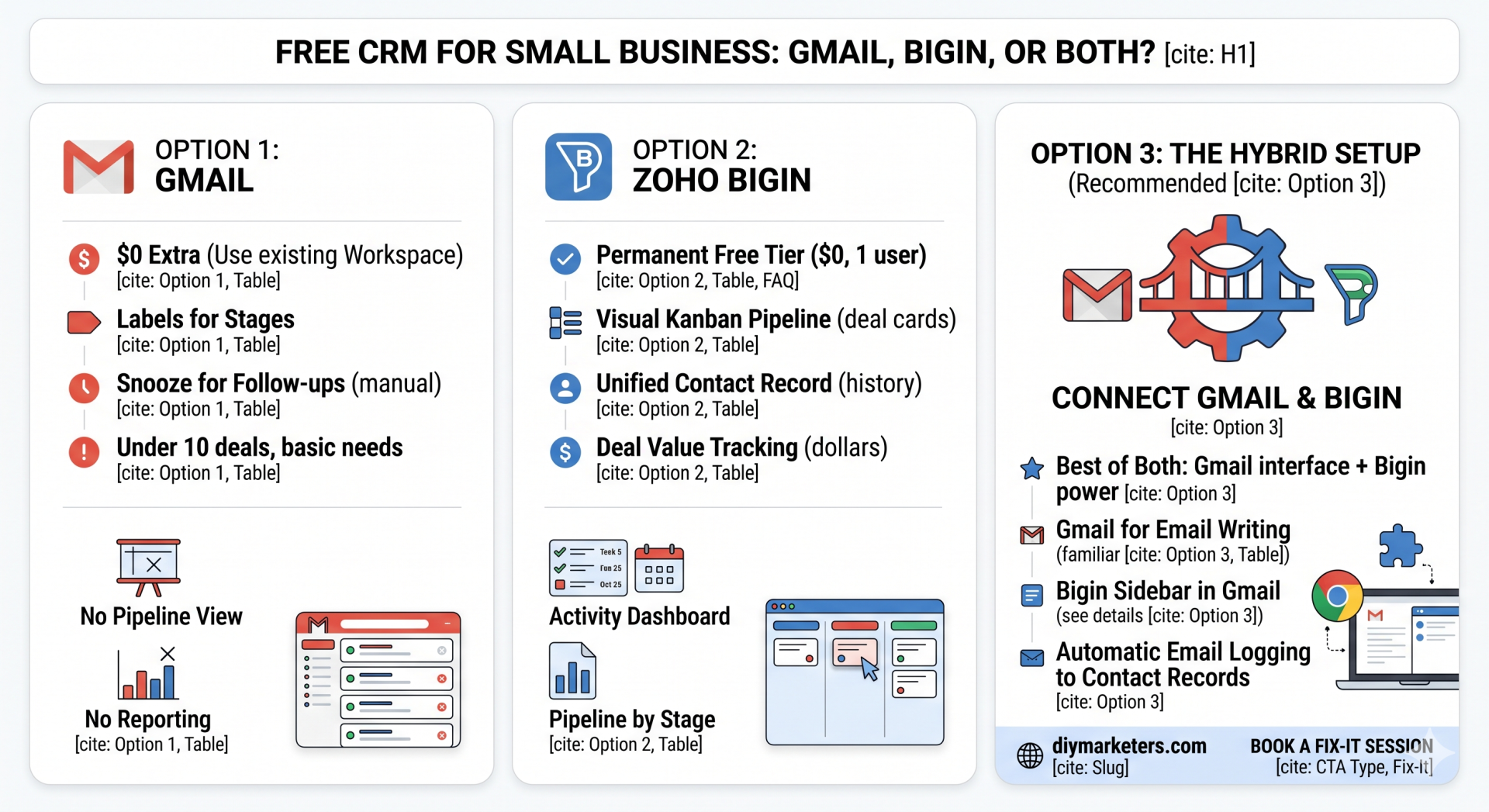
Option 1 — Gmail as a free CRM for small business
Gmail is the most widely used CRM for small business owners, even though nobody calls it that. If you use starred emails to flag follow-ups, labels to sort contacts by status, and search to find old conversations, you’re running a CRM. It just doesn’t look like one.
Here’s what makes Gmail work as a CRM:
- Zero setup cost. If you’re already on Google Workspace at $6/month, your CRM has no additional line item.
- Everything lives in one place. Every conversation, proposal, and follow-up is already in your inbox. No importing, no syncing, no second tab.
- Search is fast and powerful. Gmail’s search handles most retrieval tasks well. You can find the last message from any contact in seconds.
- Labels create basic pipeline stages. “New Prospect,” “Proposal Out,” “Active Client,” “Follow Up” — a four-label system gives you a rough pipeline view for free.
- Snooze works as a follow-up trigger. Snooze an email to resurface it in three days. Simple, effective, already built in.
For a solopreneur with fewer than ten active deals and straightforward follow-up needs, this setup holds. I’ve seen it run clean businesses for years.
Where it breaks:
- No pipeline view — you can’t see all your deals on a board at once
- No deal value tracking — you can’t answer “what’s my pipeline worth right now?”
- No reporting — close rates, average deal time, stalled stages are invisible
- Follow-up reminders break when you dismiss a snooze and forget to reschedule
- Contact history fragments when someone emails from a second address
If you want the full picture of what Gmail can and can’t do as a standalone CRM, the complete Gmail CRM guide for small business covers every extension, workaround, and failure point in detail.
Option 2 — Zoho Bigin as a free CRM for small business
Zoho Bigin is a lightweight CRM built specifically for small businesses and solopreneurs. It is not a stripped-down version of a big enterprise tool. It was designed from scratch for the kind of business where one person manages their own sales pipeline.
The main view is a Kanban board. Each column is a deal stage. Every active prospect or client lives on a card you drag forward as the relationship progresses. At a glance, you see your entire business — what’s moving, what’s stalled, and what needs attention today.
That single view is the thing Gmail cannot replicate.
Bigin also stores contact records, logs email history, tracks tasks and calls, runs basic automations, and lets you build multiple pipelines if you sell more than one type of offer. For independent reviews from actual users, Capterra’s Bigin reviews give you an unfiltered look.
Bigin pricing — the free CRM for small business details:
- Free plan: One user, one pipeline, 500 records. No credit card. A real working CRM, not a 14-day trial.
- Express — $7/user/month (annual): Three pipelines, 50,000 records, email integration, basic automation. Where most small business owners land.
- Premier — $12/user/month (annual): Ten pipelines, deeper reporting, more automation rules.
- Bigin 360 — $18/user/month (annual): For small teams with forecasting and dashboard needs.
See the full Bigin pricing breakdown for current plan details. For most solopreneurs, the free plan or Express handles everything for the first year. And for context on how Bigin fits into Zoho’s broader ecosystem, the Zoho One review shows how the pieces connect if you ever want more tools under one roof.
Free CRM for small business — Gmail vs Bigin side by side
| What you need | Gmail CRM | Zoho Bigin (free) |
|---|---|---|
| Cost | $0 (already in Google Workspace) | $0 for one user |
| Pipeline view | ❌ Labels only — no board | ✅ Kanban board, stages, deal cards |
| Deal value tracking | ❌ Not possible natively | ✅ Dollar amounts per deal |
| Follow-up reminders | ⚠️ Snooze only — manual and fragile | ✅ Tasks with due dates, activity dashboard |
| Contact history | ⚠️ Thread-based, breaks across email addresses | ✅ Unified contact record with full timeline |
| Reporting | ❌ None | ✅ Pipeline by stage, activity reports |
| Email writing | ✅ Native, fast, full-featured | ⚠️ Logs emails but Gmail writes them better |
| Setup time | Zero — you’re already using it | 30–60 minutes to configure and connect |
| Best for | Under 10 active deals, simple follow-ups | 10+ deals, multiple offer types, needs pipeline visibility |
Option 3 — the hybrid setup that uses Gmail and Bigin together
The hybrid is where most small business owners end up, and it’s the setup I’d recommend from the start. Gmail does what it does better than any CRM — writing and reading email is fast, familiar, and frictionless. Bigin does what Gmail can’t — it shows you your pipeline, tracks deal values, surfaces follow-up tasks, and keeps contact history clean.
You don’t give up one for the other. You connect them and they share information.
How to set up the Gmail + Bigin hybrid in under an hour:
- Create your Bigin account at bigin.com. Select the free plan. No credit card required.
- Build your pipeline stages. Before you touch any settings, sketch five or six stages on paper: New Lead → Discovery Call → Proposal Out → Negotiating → Closed Won / Closed Lost. Then build those as columns in Bigin.
- Connect Gmail. Go to Settings → Email Integration → Gmail. Authenticate with your Google account. From this point, emails between you and any Bigin contact log automatically to their record. You see the full conversation thread inside Bigin without leaving your inbox.
- Install the Bigin Chrome extension. This puts a Bigin sidebar directly inside Gmail. When you open any email, you can see that contact’s deal stage, log a note, create a follow-up task, or move the deal forward — without switching tabs. This is the bridge that makes the hybrid feel seamless.
- Import your existing contacts. Export your Gmail contacts as a CSV and import into Bigin. Your existing relationships become contact records immediately.
- Add your first five active deals. Don’t try to migrate everything at once. Start with your five most active prospects. Create a deal card for each, set the stage, add any notes from previous conversations.
After setup, the daily rhythm is: Gmail for writing emails, Bigin sidebar for seeing what’s happening. Two minutes of pipeline review in the morning. Cards moved when deals progress. Follow-up tasks set when you leave a conversation open-ended.
How to follow up with prospects using the Gmail + Bigin hybrid
According to Salesforce research, 80% of sales require five or more follow-up contacts. Most small business owners stop at one — not because they don’t care, but because there’s no system telling them to go back.
Here’s how the hybrid handles this:
When a new prospect reaches out: Open the email in Gmail. The Bigin sidebar shows whether they already exist as a contact. If not, create them in one click. Add a deal card, set the stage to “New Lead,” log a note about what they need and their timeline.
After your first conversation: Log a follow-up task in Bigin with a specific due date — not “soon,” a date. Five days. The task appears on your Bigin activity dashboard that morning. You open Gmail, find their thread, and send the follow-up. Thirty seconds of navigation.
When a proposal goes out: Drag the deal card from “Discovery Call” to “Proposal Out” in your Bigin pipeline. Set a follow-up task for five business days. When it surfaces, you’re not digging through 200 emails to remember what you sent — the deal record has the full history.
When someone goes quiet: Your pipeline shows every deal and how long it’s been sitting in each stage. A deal that hasn’t moved in two weeks is visible immediately. Gmail buries it. Bigin surfaces it.
How to stay in touch with existing clients using the hybrid
New deals get all the attention. Existing clients are where the money actually is — repeat work, referrals, upsells — and most small business owners have no system for keeping those relationships warm after a project closes.
The fix is a second Bigin pipeline for existing clients. Set it up with stages like:
- Active — currently engaged on a project
- Delivered — work complete, no next conversation scheduled
- Check-in due — 60–90 days since last contact
- Referral conversation — time to ask who else they know
- Re-engagement — went quiet, worth a nudge
Every client who closes a project moves from your sales pipeline into this client pipeline. Once a month, spend 20 minutes scanning it. Move cards. Log notes. Set the next follow-up task. This is how relationships stay warm without a single awkward “just checking in” cold email.
If you want to build a referral system on top of this structure, how I use Nimble for referrals covers a similar pipeline approach for tracking who owes you a referral conversation. And networking workflows that build real trust shows how to extend this into your broader relationship management.
On the Zoho side, Zoho’s AI features are worth knowing about — several of them automate parts of this client follow-up workflow once you’re set up on Bigin.
Which free CRM for small business is right for you — a simple decision guide
If you’re still deciding which option fits your situation, use this:
Stay on Gmail only if: You have fewer than 10 active deals at any time. Your follow-ups are simple and infrequent. You’ve never lost a deal because of a missed follow-up. You don’t need to report on revenue or pipeline status.
Move to Bigin free plan if: You’re already tracking deals in a spreadsheet alongside Gmail. You’ve missed a follow-up in the last 90 days. You can’t answer “what’s my pipeline worth right now?” without guessing. You’re adding a VA or contractor who needs access to client history without access to your entire inbox.
Use the Gmail + Bigin hybrid if: You want to keep Gmail as your email interface but need pipeline visibility on top of it. This is the recommendation for most small business owners — it costs nothing, takes under an hour to set up, and solves the three most common CRM failures simultaneously.
For a full breakdown of how the Bigin sales pipeline setup works step by step, that guide walks through configuration from scratch. And if you’re currently overpaying for HubSpot, Keap, or Salesforce and wondering whether a free option can actually replace them, the free CRM for small business comparison gives you the direct cost breakdown. Also worth a scan: how to do a marketing audit when nothing is working — because a CRM problem is often a marketing system problem wearing a CRM costume.
Frequently asked questions about free CRM for small business
Can Gmail actually work as a free CRM for small business?
Yes, with caveats. Gmail works as a free CRM for small business owners managing a low volume of active deals with simple follow-up patterns. The system relies on labels for organization, starred emails for flagging, and the snooze function for surfacing follow-ups. For a solopreneur doing light outreach or managing a handful of client relationships, this setup is functional and costs nothing beyond an existing Google Workspace subscription. The limitations become real when you need pipeline visibility across multiple deals simultaneously, deal value tracking, structured follow-up reminders that don’t depend on manual calendar entries, or any kind of reporting on close rates and revenue forecasting. At that point, Gmail alone isn’t a CRM — it’s an inbox with good intentions. The upgrade path is either the Gmail + Bigin hybrid setup or a move to Bigin’s free plan as your primary system.
What does Zoho Bigin’s free plan actually include?
Zoho Bigin’s free plan includes one user, one sales pipeline with unlimited deal stages, up to 500 contact records, Gmail and Google Calendar integration, task and activity management, deal-level notes, and basic mobile access. There is no credit card required and no trial period — the free plan is a permanent tier, not a conversion funnel. What it doesn’t include: multiple pipelines (you’re limited to one), automation rules, advanced reporting, and mass email capabilities. Those features appear in the paid Express plan at $7 per user per month billed annually. For a solo business owner setting up their first real pipeline, the free plan covers everything needed to track deals, manage follow-ups, and see the full shape of active opportunities at a glance. Most small business owners run on the free plan longer than they expect before needing to upgrade.
How long does it take to set up the Gmail and Bigin hybrid?
The Gmail and Bigin hybrid setup takes between 45 minutes and two hours, depending on whether you’re importing existing contacts. The core steps are: creating your Bigin account and configuring your pipeline stages (15–20 minutes), connecting Gmail through Bigin’s email integration settings (10 minutes), installing the Bigin Chrome extension for the Gmail sidebar (5 minutes), and importing your existing contacts from a Gmail CSV export (15–30 minutes depending on contact volume). Adding your first five to ten active deals takes another 10–15 minutes. The fastest path is to sketch your deal stages on paper before you open Bigin — something like New Lead, Discovery Call, Proposal Out, Negotiating, Closed. Once you have those stages clear, the technical setup is straightforward. After the first session, daily maintenance is minimal: move cards when deals progress, set follow-up tasks, and check the activity dashboard each morning.
Do I need to pay for anything to use Gmail and Bigin together?
No. The Gmail and Bigin hybrid setup costs nothing beyond what you’re likely already paying. If you’re on Google Workspace — the standard business Gmail at $6 per user per month — that subscription includes Gmail, Google Calendar, and Google Contacts, all of which integrate with Bigin. Bigin’s free plan is permanent and requires no credit card. The Chrome extension that connects the two is also free. The only costs come if you choose to upgrade Bigin to the Express plan at $7 per user per month for additional pipelines and automation, or if you need more than 500 contact records. For most solopreneurs and micro-businesses, the entirely free version of this hybrid setup — Google Workspace plus Bigin free — handles everything needed to manage a sales pipeline, track client relationships, and follow up consistently. Total additional cost to your existing Google subscription: zero.
When should I stop using a free CRM and pay for something more powerful?
The decision to move beyond a free CRM for small business should be driven by a specific limitation, not by the feeling that you should be using something more sophisticated. Upgrade when the free plan’s 500-record limit becomes a real constraint, when you need multiple pipelines to manage different offer types separately, or when you want automation rules that trigger follow-up tasks or emails based on deal stage changes. If you’re considering enterprise tools like HubSpot or Salesforce, ask yourself whether you need the marketing automation, landing pages, and multi-channel attribution those platforms offer — or whether you just need a better pipeline. Most small businesses that upgrade to expensive CRMs are paying for features they will never configure. Start with the free Gmail and Bigin hybrid, use it for six months, and let actual limitations drive the upgrade decision rather than marketing materials from software companies.